 By Lal Singh
 Kredily is a popular cloud-based HR and payroll software used by thousands of businesses across India to manage employee attendance, payroll processing, leave management, and compliance tasks in one platform. The Kredily login portal allows employees, HR managers, and business owners to securely access their dashboard and manage daily workforce operations online.
What is Kredily?
Kredily is an AI-powered HRMS (Human Resource Management System) designed to simplify HR operations for startups, SMEs, and large organizations. The platform helps companies automate payroll calculations, attendance tracking, and statutory compliance such as PF, ESI, and TDS.
The software is trusted by thousands of businesses and supports employee self-service features like downloading payslips, applying for leave, and checking attendance records.
Users can access all these services through the official login portal: https://kredily.com/
Kredily Login Portal
To access your account, users must log in through the official dashboard. The login process is secure and uses OTP verification for authentication.
Kredily login is mainly used by:
- Employees
- HR managers
- Business owners
- Payroll administrators
How to Login to Kredily (Step-by-Step)
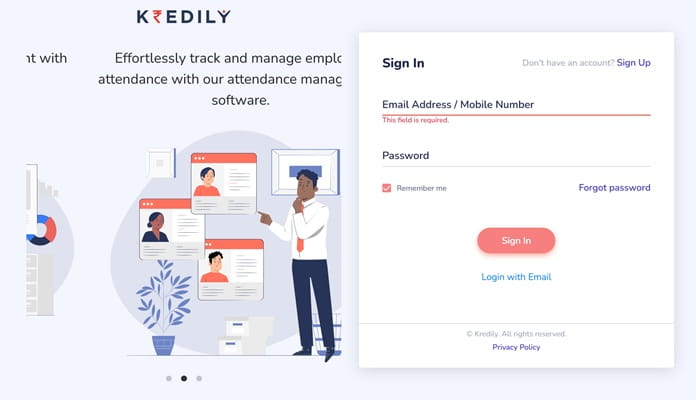
Follow these simple steps to log in successfully:
Step 1: Visit the Official Website
Open your browser and go to the Kredily website or login dashboard.
Step 2: Enter Login Details
Provide your registered:
- Email ID
- Mobile number (if required)
Step 3: Receive OTP
You will receive a One-Time Password (OTP) on your registered mobile number for security verification.
Step 4: Verify OTP
Enter the OTP and click Verify.
Step 5: Access Dashboard
Once verified, you will be redirected to your Kredily dashboard where you can manage HR and payroll tasks.
How to Clock In and Clock Out in Kredily
Kredily also offers an attendance system through a web clock feature.
Steps:
- Log in to your dashboard.
- Locate the Web Clock option at the top corner.
- Click the web clock to log in (clock-in).
- Click again to log out (clock-out).
This feature helps track employee working hours automatically.
Key Features Available After Kredily Login
After logging into the portal, users can access several powerful HR tools:
1. Attendance Management
- Web clock attendance
- Geo-tracking and geo-fencing
- Face recognition attendance
- Automatic clock-in/out
2. Payroll Automation
- Salary calculation
- Payslip generation
- Tax deductions automation
- Compliance management
3. Leave Management
Employees can:
- Apply for leave
- Track leave balance
- Check approval status
4. Employee Self-Service
Staff members can:
- Download payslips
- Update personal details
- View attendance analytics
These features reduce manual HR work and improve efficiency across organizations.
Benefits of Using Kredily Login Portal
Here are some major advantages:
- Secure OTP-based login system
- Easy attendance tracking
- Automated payroll processing
- Compliance with Indian labor laws
- Cloud-based access from anywhere
- Saves HR teams significant time every month
Kredily helps organizations manage their entire HR lifecycle without relying on spreadsheets or manual calculations.
Common Kredily Login Issues & Solutions
- OTP Not Received
- Check network signal.
- Verify registered mobile number.
- Request OTP again after a few seconds.
- Wrong Login Details
Ensure you are using the correct registered email or phone number.
- Forgot to Clock In or Out
Employees can send an attendance correction request to HR or manager for approval through the attendance log section.
- Browser Problems
Try clearing cache or switching browsers if the dashboard does not load properly.
Who Can Use Kredily?
Kredily is suitable for:
- Startups
- Small businesses
- SMEs
- Enterprises
- Remote teams
- HR departments
The platform even offers a free plan with essential HR and payroll features, making it accessible for growing companies.
Conclusion
The Kredily login portal provides a simple and secure way for businesses and employees to manage HR operations online. With features like payroll automation, attendance tracking, leave management, and employee self-service, Kredily has become one of the most practical HRMS solutions for Indian companies.
By following the login steps mentioned above, users can quickly access their dashboard and efficiently manage daily workforce activities without complicated processes.
For the best experience, always log in through the official website and keep your registered mobile number active for OTP verification.